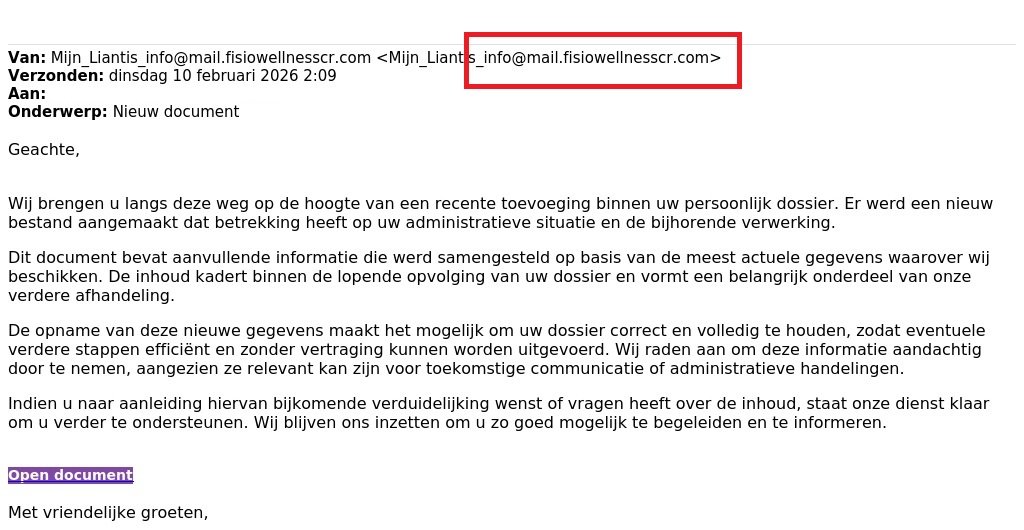
We are currently receiving many reports of suspicious messages that appear to come from social secretariats (in this case Liantis). Similar messages that imitate other secretariats also appear regularly.
The message asks you to click on a link (Open document). If you click on it, you will be taken to a form where you are asked to fill in your details. Do not do this under any circumstances.
Have you received such a message?
- Do not click on the link and certainly do not fill in any details.
- Go to the login page of your social secretariat yourself and check whether there is a message for your organisation.
- Forward the message to suspicious@safeonweb.be and then delete it.
Read the warning pages of your social secretariat:
volledige breedte
Don't fall into the trap!
Learn how to recognise fraudulent messages: Find out more at surfwithoutworries.safeonweb.be
What to do?
- Do not click on a link in a suspicious message, do not open attachments and do not download applications if you are asked to.
- Suspicious emails can be forwarded to suspicious@safeonweb.be.
- Suspicious text messages can also be forwarded. Take a screenshot and send it to suspicious@safeonweb.be. The content is then processed automatically.
Did you click on a suspicious link?
- If you have clicked on the link, do not complete the fields and terminate any interaction.
- NEVER give out personal codes.
- If you have entered a password that you also use elsewhere, change it immediately.
Have you been scammed?
- If you have lost money or are being extorted, we recommend that you file a report with your local police straight away.
- Contact your bank and/or Card Stop on 078 170 170 (+32 78 170 170 from abroad) if you have passed on bank details, money is disappearing from your bank account or if you have transferred money to a scammer. In this way, any fraudulent transactions can be blocked.
volledige breedte